Designing Discord Server Operations
This article presents practical design principles for structuring and operating a Discord server according to the nature of communication (transient messages, static resources, ongoing tasks, and knowledge sharing). It covers appropriate channel types, forum utilization, category layout, policy definition, and operational examples applicable to both community and team contexts.
Hello — this is Pan.
In this article I will discuss a practical approach to designing an ideal Discord server structure by focusing on chat types, category organization, and the intrinsic nature of different conversations. The guidance is intended to be applicable to both community and friend servers; please feel free to adapt it as needed.
Preface
The intention here is to propose recommended usage patterns from the perspective of server administrators in order to improve channel hygiene and end-user convenience. This is not a prescriptive rule that must be followed in all situations. Optimal configurations vary depending on the organization or community, its members, and its objectives. It is therefore important to understand the underlying principles and apply them appropriately.
Introduction
Before proceeding, let us briefly review the available channel types.
| Channel Type | Description |
|---|---|
| Text | Allows sending messages and images |
| Voice | Supports voice, video, and screen sharing |
| Forum | Creates structured spaces for organized conversations |
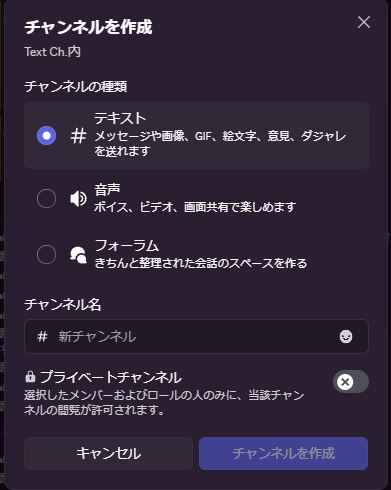
Discord also provides numerous features such as:
- Roles
- Channel categories
- Server boosting
- Threads (internally similar to forums)
- Notification settings
- Webhooks
- Bots
- Events
- Community features
- Integrations with external applications
All of these features make Discord highly versatile. Nonetheless, at its core, Discord is a chat tool. When comparing it to other communication platforms, the differences typically revolve around UI/UX and feature sets, which in turn affect usability and the visual presentation of information.
The Nature of Communication
The following discussion will take a somewhat abstract turn. I will frame this primarily in the context of "work" so that the categories and examples are concrete. In professional interactions, conversations serve various functions: coordination, instruction, announcements, consultations, and so forth. These different functions have distinct characteristics, and channels should be organized according to those characteristics.
Below is a conceptual mapping that links the nature of communication to channel types and examples.
| Nature | Channel Type | Examples |
|---|---|---|
| Transient information | Text channels | Introductions, casual chat, attendance, quick questions |
| Static information | Forums, pinned messages | Procedures, rules, official flows |
| Ongoing tasks / project management | Forums, Events | Create a forum thread per project; manage deadlines with Events |
| Knowledge and meeting records | Forums | Use threads as document-like units and separate topics per thread |
A reminder: optimal choices depend on the community or organization. Items three and four above are particularly relevant in a work setting; they may be unnecessary for purely social servers. The key point is to think deliberately about how different types of content should be managed.
Example Server Structure
Below is an example layout from my personal development server:
- Administration --------------- (Category)
  - Server Guide (Text channel)
- Text Channels ---------------- (Category)
  - Entrance (Text channel)
  - Communication (Text channel)
  - QA (Text channel)
  - Announcements (Text channel)
  - Development Room (Text channel)
- Development ------------------ (Category)
  - Documentation (Forum channel)
  - Specifications (Forum channel)
  - Resource Library (Forum channel)
  - QA (Forum channel)
  - Meeting Minutes (Forum channel)
- Notification Channels --------- (Category)
  - GitHub (Text channel)
  - Bot (Text channel)
As shown, notification channels (for example, GitHub webhook notifications) are separated into their own category to avoid cluttering general discussion areas.
Defining Rules = Restricting Freedom
Experimenting with unconventional uses of a communication tool can be valuable because it increases options. However, departing from conventional usage often necessitates rules. What may be acceptable or even beneficial for server administrators can feel restrictive or unfamiliar to participants. In this sense, "defining rules = restricting freedom."
To mitigate perceived restrictions, it is helpful to combine platform features with bots and external tools to guide user behavior subtly. If the server is structured so that users intuitively understand how to navigate it, rules will feel less like a limitation and more like a helpful guide. Accordingly, do not feel compelled to rely solely on Discord's built-in features; integrations and bots can improve the user experience and help enforce conventions in a friendly manner.
About Forum Channels
A forum channel provides an interface similar to many document-centric tools.
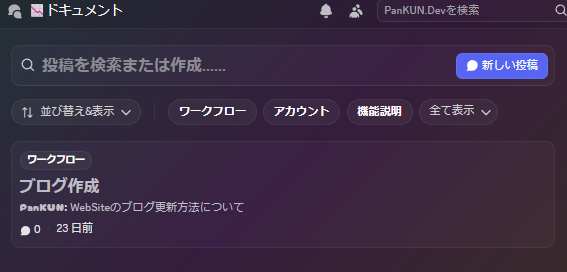
Forums include essential document-management capabilities such as:
- Search
- Tag filtering
- Sorting
Additionally, they offer:
- Following
- Archiving
- Reactions
If you create documentation using Discord's supported Markdown features and treat each thread as a separate document, the result becomes an easily navigable knowledge base.
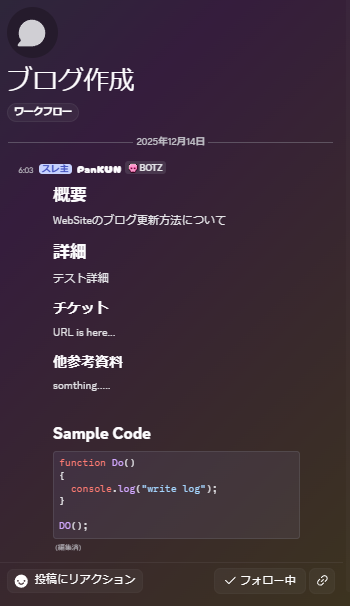
If you desire further standardization, define templates or conventions and place them in an appropriate channel for reference by contributors.
Lifespan of Communication by Type
Before discussing lifespan, a caveat: while we can identify tendencies, the lifespan of specific messages or threads is determined by content and timing. Organizational culture influences these tendencies, and if no norms exist, the result can be chaotic. In such cases, experimenting with rules and observing outcomes is advisable. If experimentation is not feasible in your environment, the organization may be at risk of breakdown when external pressures arise. Conversely, if the organization is intentionally short-lived, prioritizing speed over formal rules may be acceptable. There is no universally correct approach—context matters.
Consider, for example, a "daily report" channel intended for casual updates:
Share what you ate today to facilitate casual communication.
The primary purpose of such a channel will determine the lifespan of its messages. If the channel's objective is merely to confirm active participation, the messages are inherently transient and do not need long-term retention. If, however, the channel serves a record-keeping or health-monitoring function, the entries may need to be preserved as part of an annual log. In some cases, messages may remain relevant for several months.
In short, content may be transient, static, or part of a continuing task depending on context. Design your channel structure to align with the expected lifespan of the communications it will host.
Conclusion
This article represents my first attempt to write about an abstract topic on this blog, so I am unsure how readable it will be. In essence, the piece discussed Discord channel operation from the perspective of communication characteristics.
This subject aligns closely with the responsibilities of a project manager. While I regard myself as still inexperienced in this area, designing servers for communities and teams is a useful exercise. Studying literature, taking courses, and observing practiced communities will build experience that can be translated into actionable improvements.
Keywords to explore for further reading include "agile development," "Scrum," and "Kanban" — these frameworks may help you refine your approach. There is also existing literature specifically about "Discord server management" that you may find helpful.
Note: Differences in Discord versions may mean that some details here are not universally applicable.
End of article: Designing Discord Server Operations.
Loading comments...