Adding Rules in Zed
A summary of how to use Zed's Rule feature
Hello! I'm PanKUN.
This time, I summarized how to use the Rule feature of Zed editor's AI function "Zed Agent".
What is the Rule feature?
Zed Agent has a feature called "Rule" that allows you to set specific instructions or constraints (rules) for dialogue with AI in advance.
For example, by setting rules like "Always answer in Japanese" or "Follow a specific coding style", you can save the trouble of repeating the same instructions every time and customize the AI's response to your liking.
Official Document is here
How to create a Rule
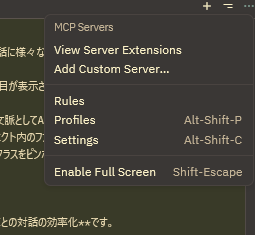
There is Rules in the menu of the 3-dot leader? at the top right of the Agent Panel.
When you press it, a screen like this will appear, so write the rule name in the title and the prompt in natural language inside.
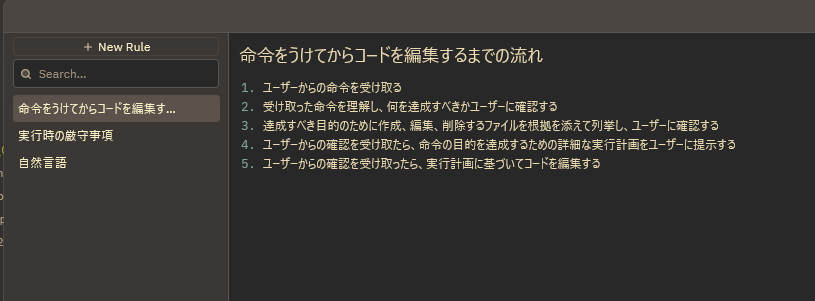
That's it!
How to apply a Rule
Zed's Rule is constantly being updated, and currently, it can be applied as follows:
- Type
@in the chat input field and select the rule name you want to apply from the displayed menu. - Select
Default Rulefrom the+button of the created Rule.
This will reflect the rule in the response. I feel that the life of that rule will change depending on the content of the prompt and the nature of the model.
Also, although the file name to be read is originally fixed for each model?, a good point of this Zed Rule is that if you create a Rule in this Rule window, it can be applied even if you switch to any model.
@ is not just for Rule application!
@ is a powerful feature for adding various contexts to dialogue with AI, not just applying rules.
When you type @, the following items are displayed in addition to rules.
- File path : Can pass the content of a specific file to AI as context.
- Files & Directories : Can make AI recognize the file and directory structure in the project.
- Symbols : Can pinpoint specific functions or classes in the code.
Merits of using @
The biggest merit of utilizing this @ feature is efficiency of dialogue with AI.
Normally,
"I have a question about the file called XX"
-> (AI looks for the file)
-> (AI reads the file)
-> "Yes, what is it?"
Such steps were necessary.
However, if you use @,
"Tell me the summary of this file @XX"
Just by typing this, AI completely omits the trouble of finding and reading the file, and can get to the main topic immediately.
This leads to saving tokens and requests used by AI, and more rapid and accurate responses can be expected.
- Depending on the type of context, placing it itself may be a cost.
Summary
Zed's @ feature is a very excellent feature for conveying the context of files and code directly and efficiently to AI, not just applying simple rules.
By mastering this feature, you can change AI from an "ignorant assistant" to an "excellent partner who understands all necessary information".
Please use it and enjoy comfortable AI coding.
Loading comments...